


Car Dashboard Widgets - HiCar
4.469.00 Reviews
App Specs
- Version
- 1.2.2
- Updated On
- License
- Free
- Downloads
- 10,000+
- Developer
- 88 Tech
- Categories
- Maps & Navigation
- Platform
- Android
Screenshots
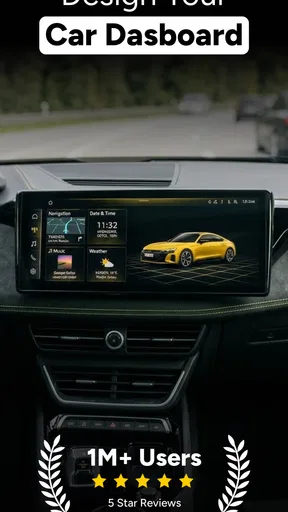
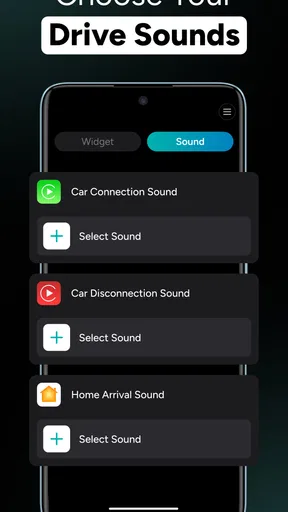
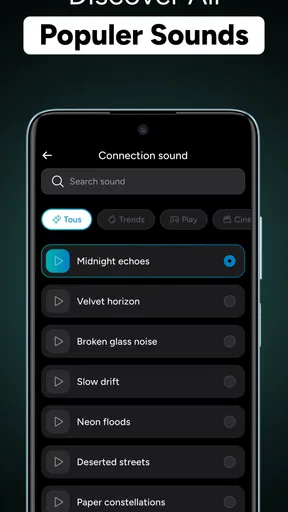
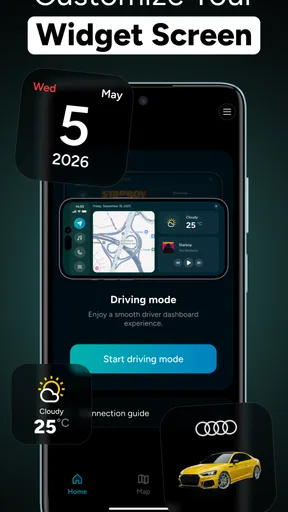
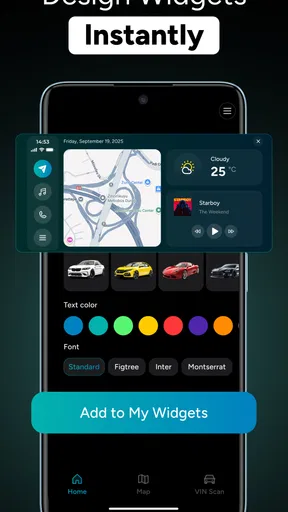
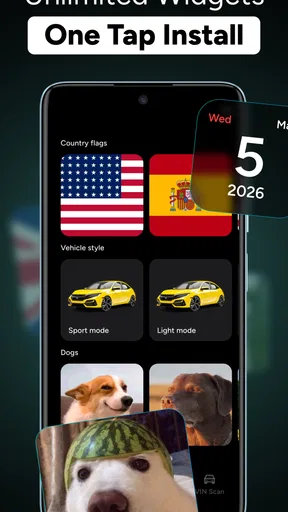
 Analysis by AppCompare
I approached Car Dashboard Widgets - HiCar as a small personalization tool rather than a replacement for a full navigation system. That distinction matters. Its purpose is to make the start of a drive feel more like your own by adding custom startup sounds and widgets, while the actual value depends on how much you care about the look and feel of your car’s dashboard experience. After spending time with it, my view is simple: HiCar is most appealing when you want a more personal driving interface without changing your entire navigation setup.
The app comes from 88 Tech and sits in the Maps & Navigation category, although its role is more about presentation and convenience than route planning. It is free to install, suitable for Everyone, and currently runs on Android 8.0 or later. The current release is version 1.2.2, and the app has built a 4.4 average from around 500 ratings, with over 10K installs. Those figures suggest a modest but positive user base rather than a huge mainstream platform, which fits my impression: this is a focused utility for drivers who notice the details.
Personalizing the first moments of every drive
The central idea is easy to understand. Instead of treating the car’s opening screen or dashboard as something fixed and forgettable, HiCar gives you a way to make that moment feel more deliberate. A custom startup sound can give the system a recognizable identity, while widgets can keep useful information or controls closer to where you expect them.
I like that the concept does not try to compete directly with established navigation apps. Google Maps, Apple Maps and dedicated driving platforms are built around directions, traffic and destination search. HiCar is aimed at the layer around those tasks: the screen you see before you begin, the arrangement of information you prefer, and the small details that make a repeated routine less bland.
That makes the app particularly interesting for people who spend a lot of time in the car. If you drive to work every day, use a compatible dashboard setup, or simply enjoy tailoring your devices, a custom opening sound can be more satisfying than it sounds on paper. It creates a clear start to the journey and can make the dashboard feel less like a generic piece of equipment.
The widgets are potentially more useful than the sound customization because they can influence how quickly you reach information. A well-arranged dashboard can reduce the need to hunt through menus before pulling away. My advice is to treat the first setup as a design exercise: decide which information you genuinely check during a normal drive, then keep the opening view restrained. A crowded dashboard may look impressive at first but become distracting once you are using it every day.
One practical workflow is to build the layout around your most common trip rather than an imaginary road adventure. For a weekday commute, you might favor a clean starting view that helps you get moving quickly. For longer journeys, a different arrangement may make more sense. The important trade-off is that personalization only helps when it reduces friction. If changing widgets becomes a hobby that constantly interrupts your routine, the app is working against its own purpose.
Worth Reading Before You Choose

Flipboard Shows What News Apps Must Do Beyond the Feed

Switching to Android Auto Means Rethinking Your Driving Routine

Google Calendar Makes a Crowded Week Easier to Manage

Ludo King Makes the Most of the Minutes Between Plans

Baby Panda World Brings Quick Play to Modern Phones, but Its Game Library Feels Busy

ESPN’s Live Game View Makes Following Close Games Easier
Where the app feels strongest
The best part of HiCar is its narrow focus. Many dashboard-related tools try to become all-in-one systems, adding layers of functions until the interface feels busy. HiCar’s appeal is more direct: it lets you shape the opening experience and place widgets where they are useful to you.
I also appreciate the emotional side of the design. A startup sound is not a major productivity feature, but driving is full of repeated moments, and small personal touches can make those moments more pleasant. Someone who has already customized a phone home screen, smartwatch face or desktop workspace will probably understand the appeal immediately.
There is also a useful distinction between customization for appearance and customization for routine. If you only want a novelty sound, the interest may fade quickly. If you use widgets to create a consistent dashboard that matches the way you actually drive, HiCar has a stronger reason to remain installed. The app becomes less about decoration and more about reducing the number of taps or visual searches needed at the beginning of a trip.
For that reason, I would not judge the app solely by how exciting its first setup feels. The better test is whether the dashboard still seems comfortable after several ordinary journeys. A sensible layout should be readable at a glance, easy to recognize, and not dependent on constant rearrangement. HiCar is at its best when the personalization quietly becomes part of your routine.
Another strength is accessibility in the broad sense. Since it is free to start with and carries an Everyone content rating, it is approachable for households where different people may use the same device or vehicle. You can explore the idea without committing to a paid navigation subscription. That said, the presence of in-app purchases means some customization or extended functionality may require spending, so I would examine the available options carefully before assuming the whole experience is included at no cost.
The meaningful limitations before you install
The biggest limitation is that HiCar is not a complete answer for drivers looking for navigation itself. It should not be chosen as a substitute for a mature mapping service when your priority is live route guidance, traffic information, place discovery or dependable turn-by-turn directions. In those situations, a conventional navigation app remains the better tool, and HiCar makes more sense alongside it than instead of it.
There is also a question of compatibility with your personal setup. The usefulness of widgets depends on where and how you use the app. A driver with a simple phone mount may find that a dedicated dashboard customization layer adds little. Someone whose vehicle or display already provides a polished interface may also see limited benefit. Before investing time in detailed personalization, I would first check whether the dashboard environment you use can show HiCar’s widgets in the way you expect.
The startup sound deserves a little caution too. What feels fun in a parked car may be less welcome early in the morning, during a quiet pickup, or when another person is sleeping. I would choose a sound that is brief and recognizable rather than loud or attention-seeking. The feature is most successful when it adds character without becoming an annoyance.
In-car attention is another important trade-off. A more attractive dashboard is not automatically a safer dashboard. Too many widgets, strong visual changes or unnecessary information can compete with the road. I would set everything up while parked, keep the driving view simple, and avoid treating customization as a reason to interact with the screen while moving. The app can help organize a dashboard, but it cannot replace good driving habits.
There is a financial consideration as well. HiCar is free, but its in-app purchases range from $4.99 to $39.99 per item. That is a wide enough range to make the purchase screen relevant to your decision. If you only want to experiment with the basic concept, the free entry point is attractive. If you are likely to buy several optional items, the total cost could change the value calculation, especially when many navigation alternatives provide their core functions without a customization fee.
How I would use it in everyday driving
Imagine a weekday morning when you get into the car with only a few minutes to spare. A carefully arranged HiCar dashboard could give you a familiar starting point instead of forcing you to search through a cluttered interface. You hear a chosen startup sound, glance at the widgets you actually use, and then open your preferred navigation service for the route. In that scenario, HiCar is not doing the mapping; it is making the transition into the drive feel more consistent.
For a family vehicle, the situation is more complicated. A single startup sound and widget arrangement may suit one driver but irritate another. If several people share the same setup, I would favor neutral choices and avoid building the entire dashboard around one person’s habits. The app is better suited to an individual driver or a vehicle where the main user controls the layout.
For enthusiasts, the appeal is clearer. If you enjoy matching your phone, car display and accessories, HiCar gives you another part of the driving ritual to shape. The non-obvious benefit is consistency: using the same visual arrangement each time can make the dashboard easier to read because you learn where everything is. The non-obvious drawback is maintenance. A layout that works in one context may not be ideal when your driving pattern changes, so it is worth reviewing the arrangement occasionally rather than assuming the first design will remain perfect.
I would also recommend testing the app during a stationary setup session before relying on it during a real trip. Confirm that the sound is comfortable, that the widgets are readable from your normal seating position, and that the opening screen does not tempt you to make adjustments once the car is moving. This small preparation step is more important than chasing a visually impressive arrangement.
Who should choose HiCar, and who should skip it?
I would recommend HiCar to drivers who enjoy personalization, use a compatible dashboard environment, and want their driving setup to feel more individual. It is especially suitable for someone who already has a preferred navigation app and wants to improve the surrounding experience rather than replace it. The free starting price also makes it reasonable to try before deciding whether the optional purchases are worthwhile.
It may also suit people who value a consistent routine. Commuters, frequent road trippers and drivers who regularly use the same vehicle can get more from a familiar widget layout than someone who drives only occasionally. The app’s benefits accumulate through repetition: the more often you see the same arrangement, the more natural it can become.
I would skip it if your only goal is the fastest possible route planning. In that case, a dedicated navigation app is a better match. I would also hesitate if you dislike tinkering, have no practical place to display the widgets, or find startup sounds distracting. HiCar is not essential equipment; its value comes from preference and routine, not from solving a problem every driver has.
Compared with the usual alternatives in Maps & Navigation, HiCar occupies a different position. Standard map apps are stronger for destinations and directions, while built-in vehicle systems may offer deeper integration with the car itself. HiCar’s advantage is the personal layer between those experiences. Its weakness is that this layer may feel unnecessary if your existing setup is already simple, fast and pleasant.
My final view after using the concept in practice
Car Dashboard Widgets - HiCar succeeds because it understands that a dashboard can be functional and personal at the same time. Its custom startup sounds provide character, while its widgets can make a repeated driving routine feel more organized. I found the idea more convincing when used with restraint: one comfortable sound, a focused layout and a clear separation between customization and actual navigation.
The app is not a replacement for Google Maps, Apple Maps or a vehicle’s native navigation tools, and expecting it to perform that role would lead to disappointment. It also asks you to think about compatibility, distraction and the cost of optional purchases. Those are not minor details, especially when the main benefit is convenience and atmosphere rather than essential navigation.
Still, I can recommend it to the right person. If you want a more personal dashboard, enjoy adjusting your digital spaces, and already have route planning covered, HiCar is a pleasant utility to explore. If you want directions and traffic first, spend your time with a dedicated map app instead. My verdict is that HiCar is worthwhile as a focused customization companion, not as an all-purpose driving platform.
That focused role is also what keeps the app honest. It does not need to replace every tool in the car to be useful. For drivers who appreciate a familiar startup ritual and a dashboard arranged around their own habits, that can be enough to make each journey begin on a better note.
Pros
- Keeps key driving information visible without opening multiple apps.
- Customizable widget layouts help match different dashboard preferences.
- Useful shortcuts can reduce the time needed to access vehicle tools.
- Supports a cleaner
- more organized in-car phone setup.
- Lightweight design is suitable for phones with limited storage or memory.
Cons
- Widget compatibility may vary between Android versions and phone launchers.
- Some features may require permissions that users may find intrusive.
- The interface can feel crowded on smaller phone screens.
- Limited usefulness if your vehicle already has a modern infotainment system.
- Battery use may increase when location or driving-related features stay active.
FAQs for Car Dashboard Widgets - HiCar
What is Car Dashboard Widgets - HiCar, and what does it do?
Car Dashboard Widgets - HiCar is designed to turn an Android device into a more convenient in-car dashboard. After installation, it can provide quick access to selected information and shortcuts through a driving-oriented interface. Depending on the device, Android version, and available permissions, users may be able to view useful widgets such as time, weather, battery details, connectivity information, or other dashboard elements while the phone is mounted in the vehicle.
Is Car Dashboard Widgets - HiCar compatible with every Android phone and car?
The application does not require a particular car brand, but compatibility can vary between Android phones, screen sizes, operating-system versions, and vehicle setups. It generally works as a phone-based dashboard rather than a built-in replacement for Android Auto or the car’s original infotainment system. Before downloading, check the app’s Google Play requirements and confirm that your device supports the necessary permissions, display settings, and widget functions.
Can I use Car Dashboard Widgets - HiCar while driving?
The app is intended to make important information easier to see at a glance, but it should not encourage phone interaction while the vehicle is moving. Set up the dashboard, choose widgets, and mount the phone securely before starting your journey. Drivers should follow local traffic laws, avoid typing or browsing during travel, and use voice controls or the car’s approved hands-free features whenever possible.
Does Car Dashboard Widgets - HiCar require an internet connection or special permissions?
Basic dashboard functions may work without a continuous internet connection, especially when they only display local device information. However, features that depend on weather updates, location, online services, or connected applications may require mobile data or Wi-Fi. The app may also request permissions related to notifications, location, overlays, or device settings. Review each permission carefully and enable only what is necessary for the features you plan to use.
Is Car Dashboard Widgets - HiCar free to download, and are there advertisements or in-app purchases?
The availability of free features, advertising, and optional purchases can change with app updates and may also differ by region or device. Users should review the current Google Play listing before installing to see whether the app includes ads, premium dashboard elements, subscriptions, or one-time purchases. If you only need a simple in-car display, test the free version first and confirm that its widgets meet your expectations.


